SignMaker Central
The above picture is a rendering of a Big Green Sign (BGS) assembly over Interstate 91 in Rocky Hill, Connecticut. It looks realistic, but it's even better than real: the two interstate highways shown were once planned, but never built.
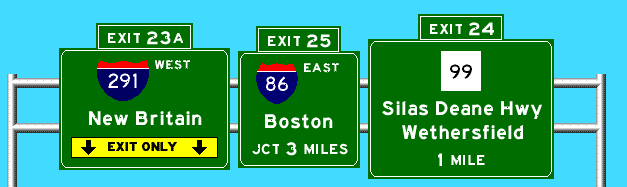
With SignMaker, you can make signs like this that say almost anything you want. With TrippyDrive '71, you can drive along make-believe freeways, seeing signs generated automatically using SignMaker technology.
SignMaker
If your computer can run Java, the SignMaker program is all you need to make signs like this, with the route numbers, town names, and markers you choose. Many people decorate their Web sites with them, but you could print signs for your little brother's Hot Wheels town, or make a personalized greeting card for a friend.
You can choose among over 40 route markers, 12 types of arrows, six types of exit tab, and four types of metal support. Finish it off with up to three lines of text, and place up to four sign panels on an overhead pole. There are still plenty of complicated real-life signs that SignMaker can't make, but the tools you have will mimic reality quite well.
You can use SignMaker online (a Java "applet"), which does not copy any files to your computer. You'll need a browser and net connection for this. Or, you can download an offline version (Java "application") that requires neither, but does need a Java runtime environment.
Before you start SignMaker, please read "How to save a sign" if you don't already know how.
- Play online
- SignMaker Lite (online) (use this smaller version if the full SignMaker won't run or runs too slowly)
- SignMaker 2.2.0 (old) (use this older version if the full or Lite SignMaker won't run or runs too slowly)
- Download for offline use
- Help and Frequently asked questions (FAQ)
How to save a sign
Because of Java's security restrictions, SignMaker and TD71 cannot write files to your system (disk drive, zip drive, etc.) How this affects you the most is that there's no "Save" function. To save a sign, take a screen shot, and edit it in your favorite paint program. Here's how:- Macintosh: press Command-Shift-3, which writes a Picture file in your hard disk's main folder. Use a tool like GraphicConverter to convert the file to PNG.
- Windows: press the Print Screen key, which places a bitmap image in the clipboard. Paste this into an image converter program.
- X Windows, run xwd, then import the file into an image program like ImageMagick, GIMP, or xv.
TrippyDrive '71
TD71, also in Java, simulates driving along a freeway. It uses SignMaker technology to draw the signs you would see (in fact, the I-91 sign shown above is from TD71). At many interchanges, you can either continue on the present freeway, or exit onto an intersecting freeway. There's no scenery, buildings, or traffic, but the signs provide a surprisingly good sensation of traveling along the road.
Currently TD71 is only available online.
Credits
All state route markers are adapted from James Lin's excellent Route Markers site. US and Interstate markers are courtesy of Richard C. Moeur.
For more information on road signs in the real world, including the US standards, visit Mr. Moeur's Traffic Signs.
Awards
SignMaker earned a Yahoo "Pick of the Week" a lifetime ago (April 1998), and is still consistently the most popular place at Kurumi.com.There are about 30-50 sites using SignMaker images, some to decorate pages unrelated to highways.
Trippy Drive '71 earned a "Useless Site of the Day" award in 1998 as well. Here's to goofing off.